Professional Canva Resume Bundle
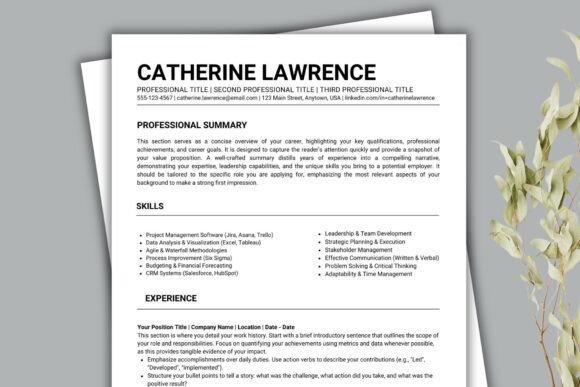
What if your next job application took less than 20 minutes—not because you cut corners, but because your tools worked *with* you? The Professional Canva Resume Bundle is a set of five purpose-built, ready-to-use templates designed for real-world use: a clean 1-page resume, a detailed 2-page version for mid-career professionals, a comprehensive 3-page layout ideal for academics or senior leaders, plus matching cover letter and reference page templates.
It’s not just about looking polished. It’s about reducing friction—between your experience and the hiring manager, between your idea and the final document, between “I need to apply today” and “I just hit send.”
Why this matters—differently—for different people
Beginners often feel overwhelmed by resume structure, formatting rules, or even where to start. With the Professional Canva Resume Bundle, there’s no need to learn desktop publishing or guess which font pairings work. You open Canva, pick a template, and replace placeholder text—no design background required. A recent college grad used the 1-page version to land three interviews in under a week, simply by swapping in their internship bullet points and adjusting colors to match their portfolio site.
Experienced professionals may already have strong content—but spend hours tweaking margins, reformatting sections, or converting files for ATS compatibility. The bundle’s layouts are intentionally built with consistent heading hierarchy, logical section order, and minimal decorative elements—all key factors that help applicant tracking systems parse your qualifications correctly. One project manager updated her 2-page resume before a promotion cycle, kept the same core content, and only changed dates and metrics—and passed every internal ATS scan on first upload.
Creatives and freelancers need resumes that reflect personality *without* sacrificing professionalism. The drag-and-drop flexibility lets you insert a subtle brand color, swap in a headshot, or adjust spacing to highlight visual work—while still maintaining readability for non-creative hiring managers. A freelance UX designer used the 2-page template as a foundation, added a small “Selected Projects” sidebar (using Canva’s shape tools), and kept the rest clean—so recruiters saw both craft and clarity.
Educators and researchers often juggle dense credentials: publications, grants, teaching history, conference presentations. The 3-page template gives breathing room without forcing content into awkward columns or tiny fonts. One university lecturer used it to organize 15+ years of service across teaching, advising, and committee work—grouping related items under clear subheadings instead of listing everything chronologically.
Small business owners and solopreneurs frequently wear many hats—and don’t have time to hire a designer for every job application or partnership pitch. They use the cover letter template not just for jobs, but to personalize outreach to clients or collaborators. One podcast host adapted the cover letter layout into a short “collab pitch” email, keeping the tone warm and professional while highlighting relevant audience size and past guest features.
No software. No subscriptions. Just control.
You don’t need Photoshop, InDesign, or even Microsoft Word installed. Everything works in your browser—or the free Canva app on iOS or Android. That means you can start on your laptop during lunch, tweak a detail on your phone while waiting for coffee, and finalize on a tablet at home. There’s no file conversion drama, no missing fonts, no “why does this look different on their end?”
The drag-and-drop interface means moving a section isn’t about wrestling with paragraph styles—it’s clicking, holding, and dropping where you want it. Change a font in one click. Swap your photo in two. Adjust line spacing or bullet indentation without hunting through menus. And because Canva saves automatically, you never lose progress—even if your Wi-Fi drops mid-edit.
ATS-friendly doesn’t mean boring
“ATS-friendly” gets misused a lot. It doesn’t mean plain text or Times New Roman only. It means predictable structure: headings marked as H2s (not bolded text), consistent bullet point usage, standard section names (“Work Experience,” not “Where I’ve Made Magic”), and no text inside images or complex tables. The Professional Canva Resume Bundle follows those principles—but still allows thoughtful design choices: a tasteful accent bar, a subtle icon set, or a well-spaced layout that guides the eye naturally down the page.
One marketing director tested all five templates through a free ATS simulator. Every version parsed fully—no missing job titles, no scrambled dates, no skipped skills sections. But when she printed them side-by-side, the 2-page version stood out most: enough space to show impact (“Grew email list by 210% in 6 months”) without crowding, and white space that made scanning effortless.
Flexibility that grows with you
You’re not locked into one format forever. Start with the 1-page version for entry-level roles or quick applications. As your experience deepens, copy your content into the 2-page layout—and add leadership examples or metrics. If you pivot into consulting or academia, the 3-page option gives room for certifications, speaking engagements, or publications—without making earlier versions obsolete.
The cover letter and reference page templates follow the same visual language, so your full application package feels cohesive—not like three separate documents cobbled together. That consistency builds quiet credibility: you’ve put thought into how your materials work *together*, not just individually.
Is this the right fit for you?
Ask yourself:
- Do you value speed *and* control—not just “fast” but “fast *on your terms*”?
- Are you applying to roles where presentation matters—but you’d rather spend time refining your story than troubleshooting formatting?
- Do you want room to express individuality (a signature color, a clean photo, thoughtful spacing) without risking readability or ATS parsing?
- Do you prefer learning by doing—editing real content in real time—over watching long tutorials or reading style guides?
If yes, the Professional Canva Resume Bundle meets you where you are. It doesn’t assume design expertise. It doesn’t require paid software. And it doesn’t ask you to choose between looking professional and sounding human.
Whether you’re updating your resume before a career shift, preparing for an internal promotion, applying to teaching positions, pitching freelance services, or supporting a student’s first job search—the same templates adapt quietly to your goals. No overhaul needed. Just open, edit, and go.